When pressing key combinations like CTRL + ALT + DEL, you can configure Windows to use sticky keys, which allows you to press the buttons of a combination sequentially instead of at the same time. In that sense, if sticky keys are active, you could press and release CTRL, press and release ALT and finally, press and release DEL to achieve the same effect as pressing the CTRL + ALT + DEL combination.
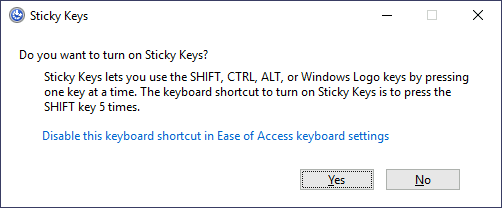
To establish persistence using Sticky Keys, we will abuse a shortcut enabled by default in any Windows installation that allows us to activate Sticky Keys by pressing SHIFT 5 times. After inputting the shortcut, we should usually be presented with a screen that looks as follows:
After pressing SHIFT 5 times, Windows will execute the binary in C:\Windows\System32\sethc.exe. If we are able to replace such binary for a payload of our preference, we can then trigger it with the shortcut. Interestingly, we can even do this from the login screen before inputting any credentials.
A straightforward way to backdoor the login screen consists of replacing sethc.exe with a copy of cmd.exe. That way, we can spawn a console using the sticky keys shortcut, even from the logging screen.
To overwrite sethc.exe, we first need to take ownership of the file and grant our current user permission to modify it. Only then will we be able to replace it with a copy of cmd.exe. We can do so with the following commands:
takeown /f c:\Windows\System32\sethc.exe
icacls C:\Windows\System32\sethc.exe /grant Administrator:F
icacls C:\Windows\System32\sethc.exe /grant Administrator:F